If your neck gets tight by mid-afternoon or your low back aches when you finally stand up, your desk setup may be part of the story. Many people in Las Vegas spend hours at a computer, whether in an office, a casino back-of-house, or a spare bedroom turned workspace.
There’s no single “perfect” posture, and your body isn’t designed to hold any position for eight hours. But a few thoughtful adjustments and regular movement can reduce strain. Here’s a practical guide.
Why desk work can strain your back and neck
Long periods of sitting tend to nudge us into the same habits: head forward, shoulders rounded, hips tucked, and eyes fixed on a screen. Over time, muscles in the neck and upper back work harder to hold your head up, while the muscles around your hips and low back get stiff from staying still.
That doesn’t mean sitting is dangerous. It means variety matters. The best posture is usually your next one, so the goal is a supportive setup plus frequent changes of position.
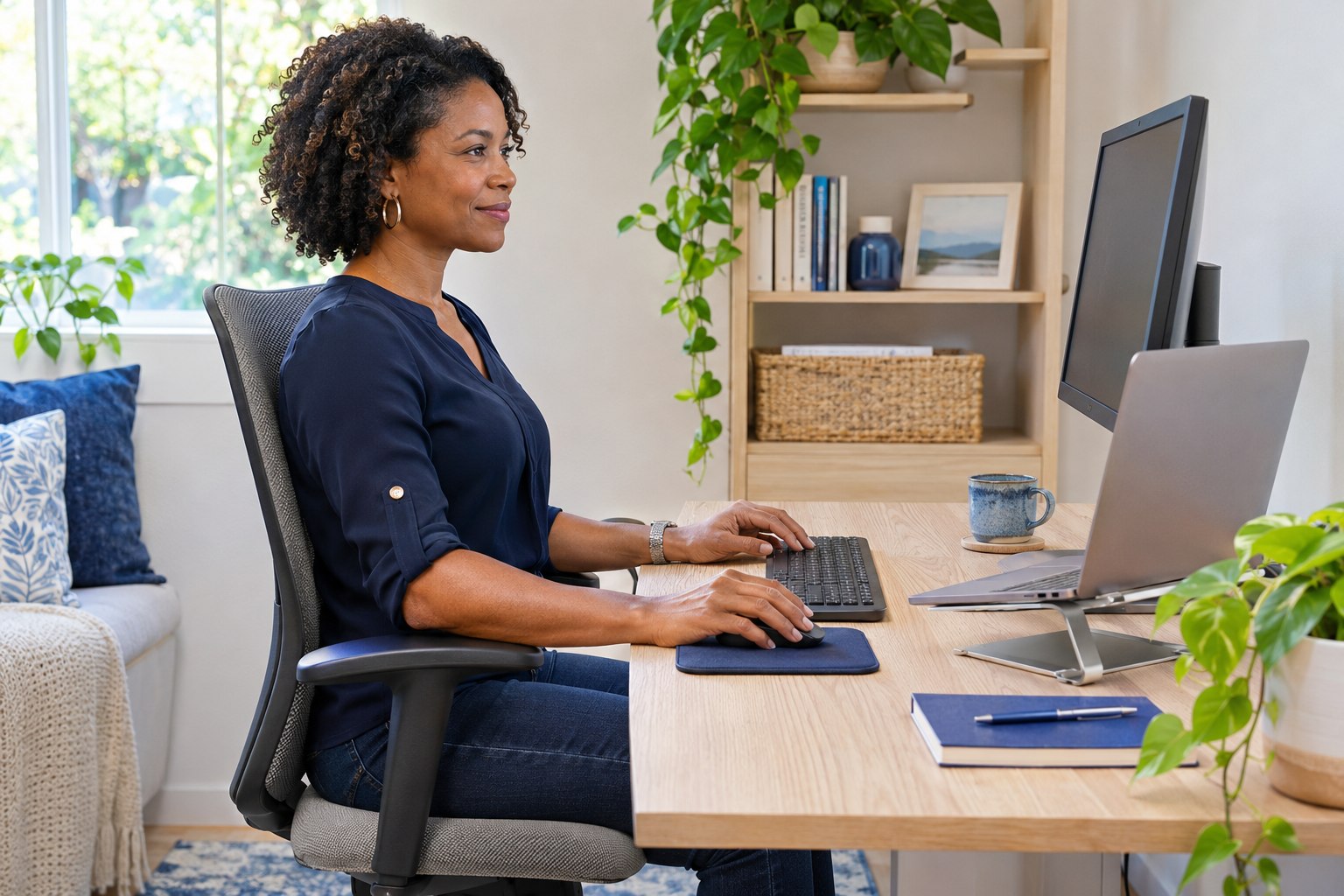
Set up your workstation
Start at the ground and work up. These are general starting points, and you may need to adjust them for your height, body, and equipment.
- Feet: Keep both feet flat on the floor or on a footrest, with knees roughly level with or slightly below your hips.
- Chair: Sit back so your lower back is supported. A small rolled towel or lumbar cushion can help if your chair lacks support.
- Hips and knees: Aim for about a fist’s width of space between the front of the seat and the back of your knees.
- Arms: Let your elbows rest near your sides at about 90 degrees, with your shoulders relaxed rather than hiked toward your ears.
- Keyboard and mouse: Keep them close enough that you’re not reaching, with your wrists in a comfortable, neutral line.
- Monitor: Place the top of the screen at or slightly below eye level, about an arm’s length away, directly in front of you.
- Laptop: Use a stand or a stack of books with a separate keyboard and mouse so you’re not looking down all day.
If you use two monitors, put the one you use most directly in front of you. Otherwise you may end up twisting your neck to one side for hours.
Build movement into your day
Even a perfect setup won’t help much if you never leave it. Short, frequent breaks are usually more useful than one long workout after work.
- Stand up and move for a minute or two every 30 to 45 minutes. A timer or calendar reminder can help.
- Take phone calls standing or walking when you can.
- Refill your water at a station farther from your desk.
- Switch between sitting and standing if you have an adjustable desk, but avoid standing in one spot for hours either.
- Walk during part of your lunch break, even if it’s just around the building.
Las Vegas summers can make outdoor walks tough, so indoor options matter. Walking the hallway, taking the stairs, or doing a lap around your home all count.
Simple stretches to try
These gentle moves are meant to be done a few times a day. Go slowly, breathe normally, and stop if anything causes sharp pain, tingling, or numbness.
- Chin tuck: Sitting tall, gently draw your chin straight back as if making a slight double chin. Hold for 3 to 5 seconds and repeat 8 to 10 times.
- Upper trap stretch: Let one ear drift toward the same shoulder, keeping the other shoulder down. Hold for 20 to 30 seconds per side.
- Shoulder rolls: Roll your shoulders up, back, and down in slow circles, 10 times.
- Doorway chest stretch: Place your forearm on a door frame and gently step through until you feel a mild stretch across the chest. Hold for 20 to 30 seconds.
- Seated figure-four: Cross one ankle over the opposite knee and lean forward slightly until you feel a stretch in the hip. Hold for 20 to 30 seconds per side.
- Standing back extension: Place your hands on your hips and lean back gently a few times to counter long periods of sitting.
If you have numbness, tingling, or pain that travels down an arm or leg, or pain that wakes you at night, don’t just stretch it out. Get evaluated. Call Zion Spine and Rehab in Las Vegas at (725) 600-7207.
Think of these as experiments rather than rules. Change one or two things, give them a week, and notice how your body responds. If a new setup feels worse, tweak it or undo it.
Everyday habits that help
Small habits stack up. Try to keep your phone at eye level instead of cradling it with your head tilted down. Carry bags on alternating sides, or use a backpack with both straps. Stay hydrated, and get enough sleep, since tired muscles tend to feel tighter.
Your eyes play a part, too. Following the 20-20-20 habit, where you look at something about 20 feet away for 20 seconds every 20 minutes, gives your eyes a break and often prompts you to shift position. Good lighting that reduces glare means you’re less likely to lean in toward the screen.
Strength matters, too. Gentle exercises for the upper back, core, and hips can support better posture over time, and a guided plan is often more effective than random stretching. Depending on your evaluation, care may include guided exercise and posture or ergonomic guidance tailored to your job.
When posture tips aren’t enough
If you’ve adjusted your setup and your pain keeps coming back, it may be time for a closer look. Persistent neck or back pain, frequent headaches, or discomfort that’s spreading to your arms or legs are good reasons to be evaluated.
At Zion Spine and Rehab, we’ll ask about your work, your daily routine, and your symptoms, and examine how you move. From there, we can talk about what might help, which can include chiropractic adjustments, joint mobilization, soft-tissue work, and a short list of exercises you can do at your desk. If your desk is wearing you down, call our Las Vegas office to schedule a visit.
This article is general information, not medical or legal advice. Talk with a qualified provider about your situation.
Questions about this topic
What is the best sitting posture for lower back pain?
There isn’t one position that works for everyone. Aim for a supported low back, feet on the floor, relaxed shoulders, and frequent position changes. If lower back pain keeps returning, an evaluation can help identify contributing factors.
Is a standing desk better for my back?
Not automatically. Standing all day can create its own strain. Alternating between sitting, standing, and walking is usually more comfortable than holding any one position for hours.
How often should I take breaks from sitting?
A short movement break every 30 to 45 minutes is a common suggestion. Even one or two minutes of standing, walking, or stretching can help reduce stiffness.
Can a chiropractor help with desk-related neck pain?
It may. After an evaluation, care can include adjustments, soft-tissue work, exercises, and ergonomic guidance. Call Zion Spine and Rehab at (725) 600-7207 to schedule.